

Younex built Ahmed Atef Coach, fitness coach Ahmed Atef's official app for his trainees, published on Google Play under the developer name Younex Solutions. The app is built with Flutter, with an Arabic and English interface, and it has two roles: the coach and the trainee. Trainees find their program with sets and reps, a workout mode that walks them through set by set with a rest timer, a meal plan and supplements with reminders, a weekly check-in with photos, an InBody history, and chat and calls with the coach. The coach gets a dashboard where he follows all his trainees in one place. Behind the app sits an API written in PHP and MySQL. We also built the same coach his website, ahmedatef.fit, which has a page for the app that links to Google Play.
Overview
Online coaching rests on one thing: follow-up. The program itself can be written on a sheet of paper, but what makes the difference for a trainee is that someone can see whether they trained, what they lifted, what they ate and where their weight is heading. Captain Ahmed Atef was working with a paper workout sheet, and with paper, follow-up depends on the trainee remembering to send updates themselves.
So the app was built to move that sheet onto the trainee's phone, and to make everything they do get recorded and reach the coach without anyone having to ask. Trainees open the app and find today's workout, log every set while they are in the gym, tick off the meals they ate, and send their weekly check-in with photos. The coach opens the same app and sees who trained and who did not, who needs a word, and whose subscription is about to end.
The app has three modes: the trainee, with the Today, Progress, Coach and Account tabs; the coach, with a dashboard, trainees, chats and a video library; and the visitor with no account, who can look around and ask to subscribe.
About the client and the sector
Captain Ahmed Atef is a personal fitness coach in Egypt who offers online coaching, fat loss and muscle building programs, nutrition plans, gym programs, and InBody and measurement tracking. His website offers online coaching to clients in Egypt, Saudi Arabia, the UAE, Kuwait and Qatar. Clients subscribe directly through the coach, and the coach is the one who creates their account in the app; there is no open sign-up.
The online coaching market has plenty of global apps, but most of them are made for a trainer selling ready-made programs to thousands of people, or for someone training alone. A coach who follows his trainees one by one needs something else: a tool carrying his name and photo, in Arabic, with the Egyptian food his trainees actually eat, that connects him to each trainee in a private chat and a call.
And when the coach writes ful, baladi bread and koshari into a plan, the app has to know their calories in the units people actually measure with, a loaf or an egg, not only in grams.
The challenge
The first problem is that a paper sheet does not talk. The coach will not know whether a trainee trained or added weight until he asks, and the trainee often forgets what they lifted last time, so they go back to the same weight or guess.
The second problem is that online coaching naturally spreads across many places: progress photos, InBody printouts, the meal plan and form videos. If each one lives somewhere different, comparing the first month with the latest one means someone has to go digging.
The third problem is scale. The coach needs to know in a minute who needs attention today without opening every trainee's file, and to build a program once and give it to several trainees.
The fourth problem is privacy. Body photos and measurements are sensitive data. They must not be visible to anyone except the trainee and their own coach, and they must not be sent to any outside service without the owner's consent.
And the fifth problem is that the app will be downloaded by people who are not clients yet, and that person should not hit a locked sign-in screen and leave.
The solution
We built a single Flutter app, one codebase that builds for Android and for iPhone, with the whole interface written in Arabic and English from the start rather than machine-translated. The language can be changed from Account at any time, and the app flips to RTL or LTR and brings the user back to the tab they were on.
Behind the app is an API in PHP and MySQL. Everything a trainee logs is saved on the server, not only on the phone, so if they change phones they sign in and find their whole history. Photos and videos are shown only to the trainee and to their own coach, after sign-in.
Reminders were split in two. Meal, supplement and workout reminders are scheduled on the trainee's own phone from the plan the coach set, and they update by themselves as soon as the coach changes a meal time. Notifications from the coach or from the chat arrive through Firebase Cloud Messaging. And scheduled jobs on the server send the welcome message, the missed-workout nudge and the renewal reminder before a subscription ends.
Voice and video calls inside the app are built on LiveKit, and a call rings full screen even when the phone is locked, once the user has given permission. Reading an InBody sheet with AI is optional: the app asks the user first, and if they agree only that photo is sent to Google Gemini to read the numbers; if they say no, they type the numbers in by hand.
For visitors without an account we built a browsing mode, from which they can send a subscription request that reaches the coach, who accepts or declines it.
Technical specifications
| Item | Details |
|---|---|
| Project type | A training and follow-up app for a personal fitness coach, with a coach role, a trainee role and a browsing mode for visitors |
| Platform | Android on Google Play under the developer name Younex Solutions; the iPhone version is being prepared from the same code |
| Build | Flutter and Dart with one codebase for both platforms, charts with fl_chart, and PDF export of the log sheet |
| Backend | A REST API written in PHP with a MySQL database, and scheduled jobs on the server for automations and reminders |
| Languages | Arabic and English on every screen, with an instant direction switch; the coach's notifications are delivered in the language of each trainee's phone |
| Notifications | Firebase Cloud Messaging for server notifications, and local reminders on the phone for meals, supplements and workouts |
| Calls | Voice and video calls with LiveKit, ringing full screen with accept and decline buttons |
| Privacy | Photos and videos are shown only to the trainee and their coach after sign-in, passwords are stored hashed, and accounts can be deleted from inside the app |
| AI | Reading the numbers off an InBody sheet from its photo with Google Gemini, only after the user agrees |
| Built-in data | 72 exercises with photos, muscles and steps in Arabic and English, and a food database of more than 170 items with values per 100 grams and in household portions |
| Look | Five colour themes, one light theme in blue and four dark ones |
Key features
The workout program: PPL or any split
The coach builds the program in the app: the program name, its number of weeks and its start date, then the days and each day's exercises with their sets and reps. Reps can be a number or a range such as 8-12, and every exercise can carry a note, such as a drop set on the last set. He also sets the weekly schedule: this day is push, that day is rest. When he types an exercise name, the app suggests names from a list in Arabic and English. When a program ends, one button starts a new cycle with the same exercises, and old programs stay in the history.
A workout mode that goes set by set with you
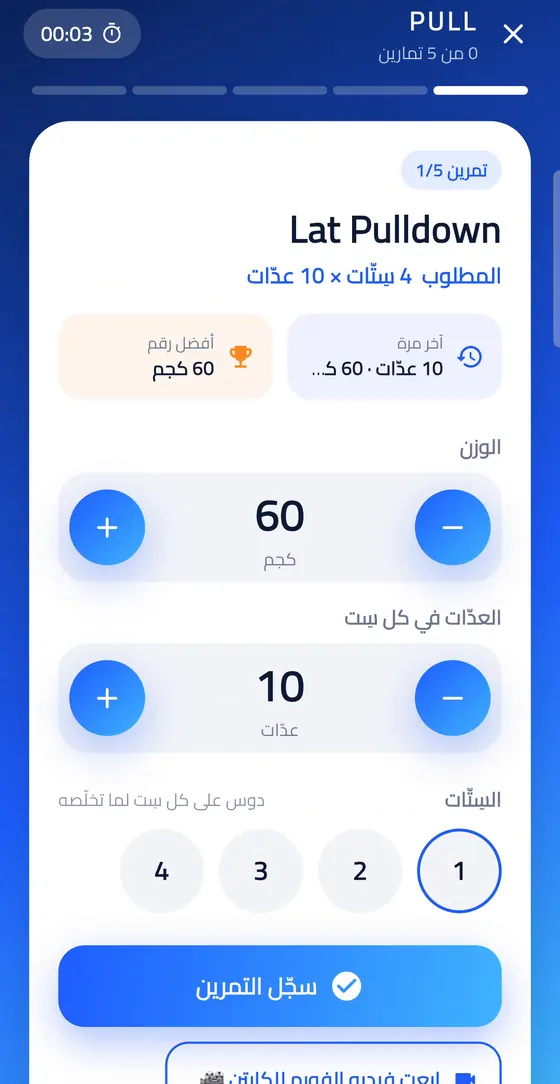
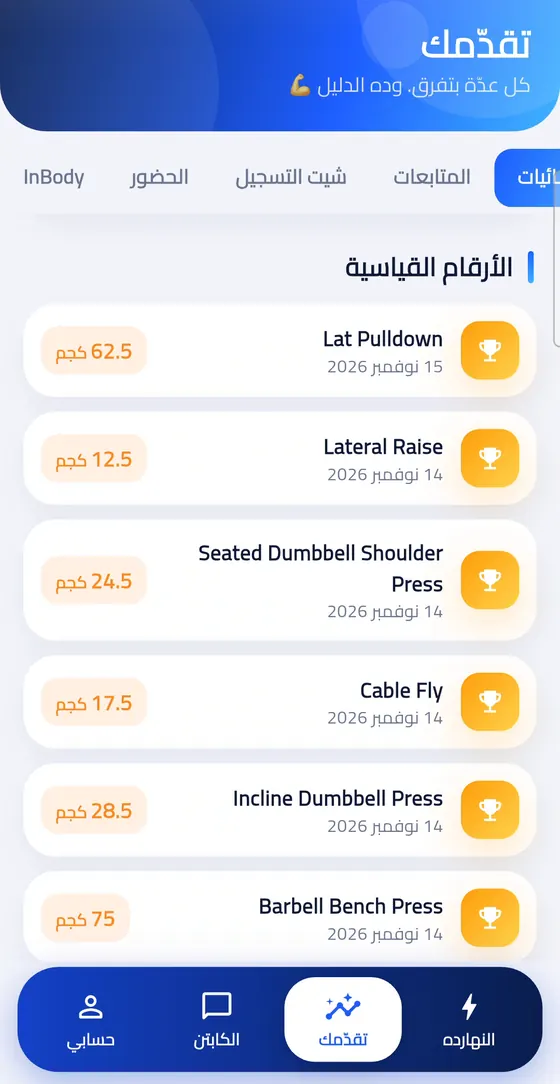
The trainee opens today's workout and taps Start workout. Each exercise shows its target, sets times reps, next to what they did last time and the best weight they have lifted before. They tap each set when it is done, the rest timer starts by itself, and they can add 15 seconds or skip the rest. If they beat their best weight, an alert announces a new personal record. At the end a summary screen shows the workout's duration, the volume lifted and any new personal records.
The coach's videos and form-check videos
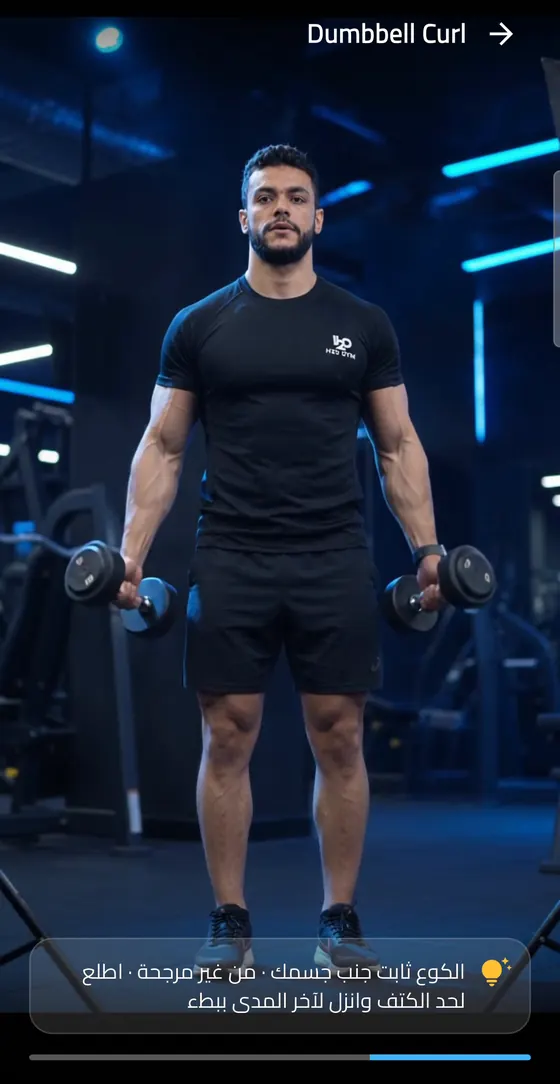
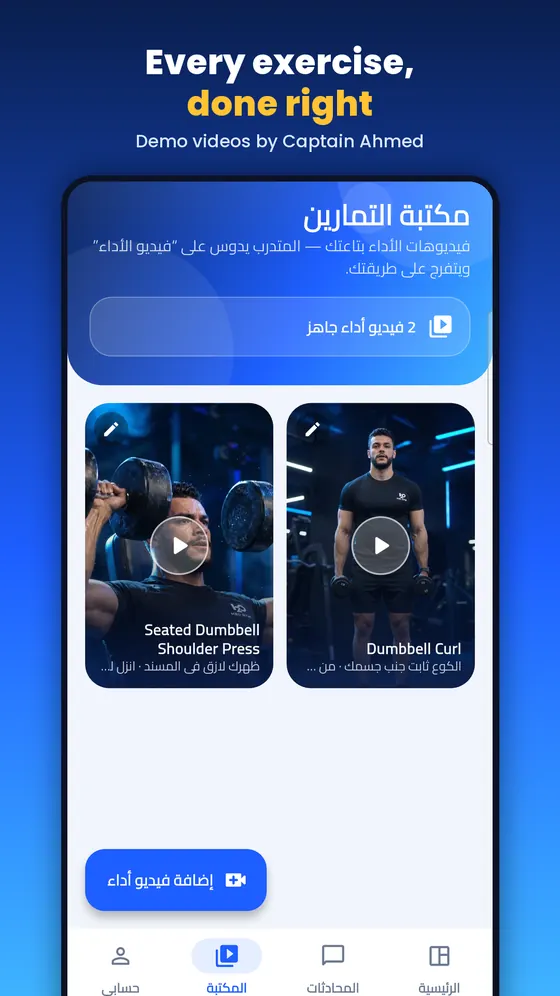
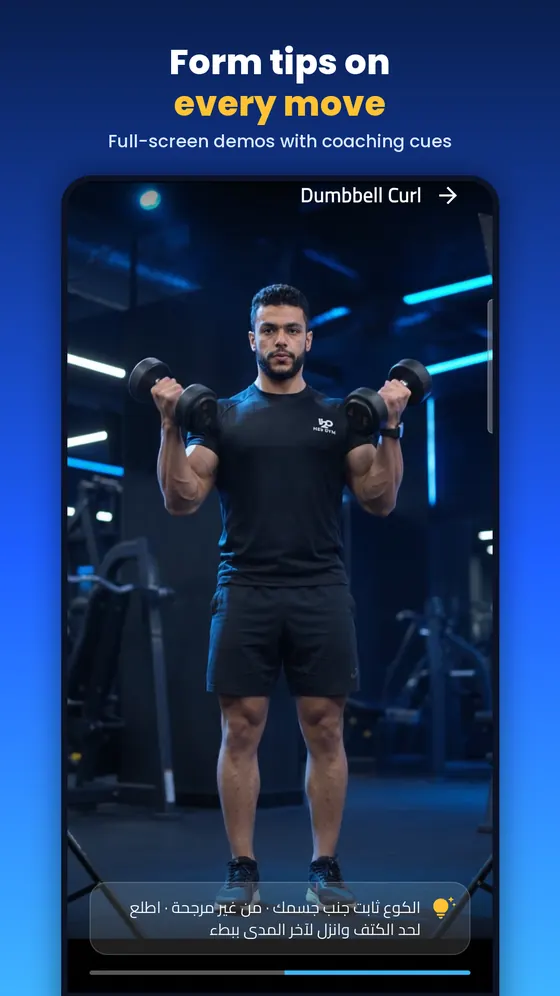
The coach has a video library: he films himself doing an exercise for 15 to 45 seconds, or pastes a YouTube link, and writes a coaching cue under the video. The trainee taps the video button next to any exercise to watch the coach do it. Alongside the coach's videos there is a built-in how-to for 72 exercises: two photos for the start and end positions, a body map that colours the main and supporting muscles, and short steps in Arabic and English. If a trainee wants the coach to check their form, they record a video from the workout screen itself and send it, and it arrives in the chat tagged with the exercise name.
Meal plan and supplements with reminders
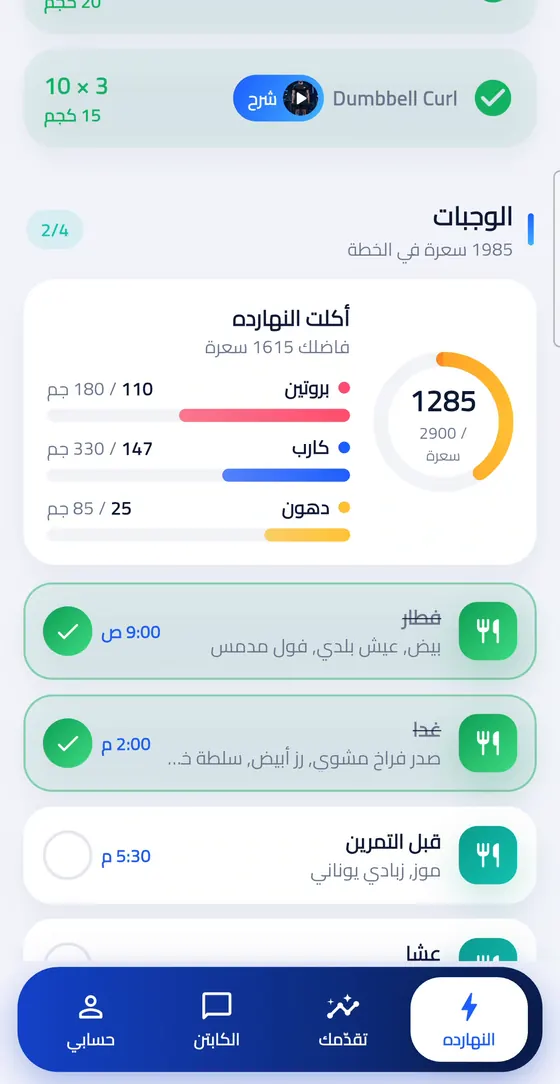
The coach writes the meals with their times, and each meal's items either from the food database or by hand, and the app works out the calories, protein, carbs and fat for each meal. Every meal can have optional swaps. Supplements have a name, a dose and a time, such as one scoop after training, plus a daily reminder on the trainee's phone. The trainee ticks off what they ate and sees the calories left.
A needs calculator and suggested meal plans
There is a calculator that works out daily needs from the trainee's weight, height, age, activity and goal using the Mifflin-St Jeor equation, and the coach adjusts the numbers. From them the app suggests ready meal plans in seven styles, among them balanced Egyptian, budget friendly, fasting and Ramadan, and vegetarian. If a trainee does not eat a certain food, the plans swap it for something similar.
Daily habits: water, sleep and steps
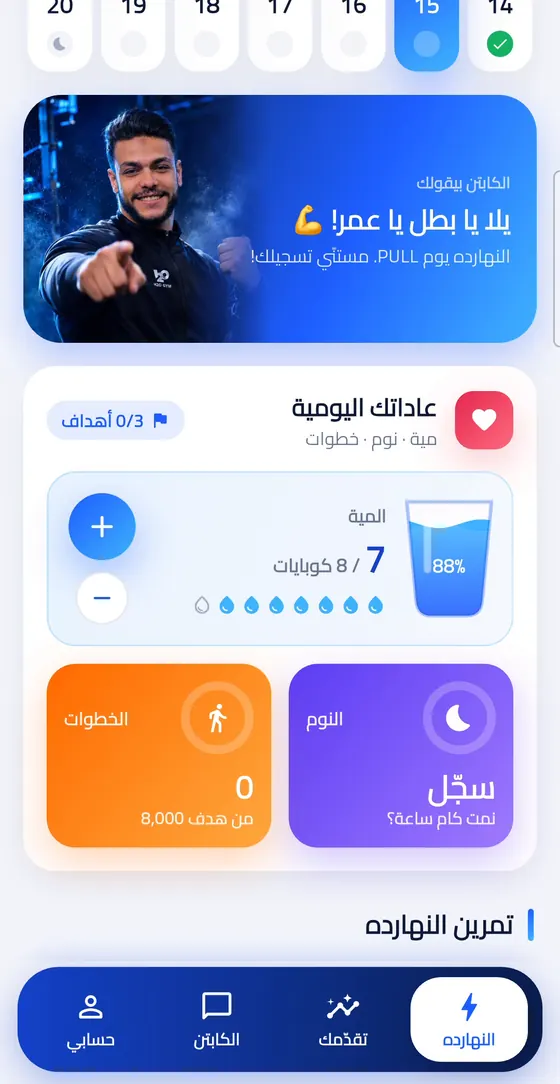
The Today screen has a habits card: how many glasses of water, how many hours of sleep, and how many steps. Steps are read from the phone's sensor, but only after the trainee agrees, and the app sends the coach only the day's total. The coach sets each trainee's targets and sees the average for the last seven days.
The weekly check-in and a before/after slider
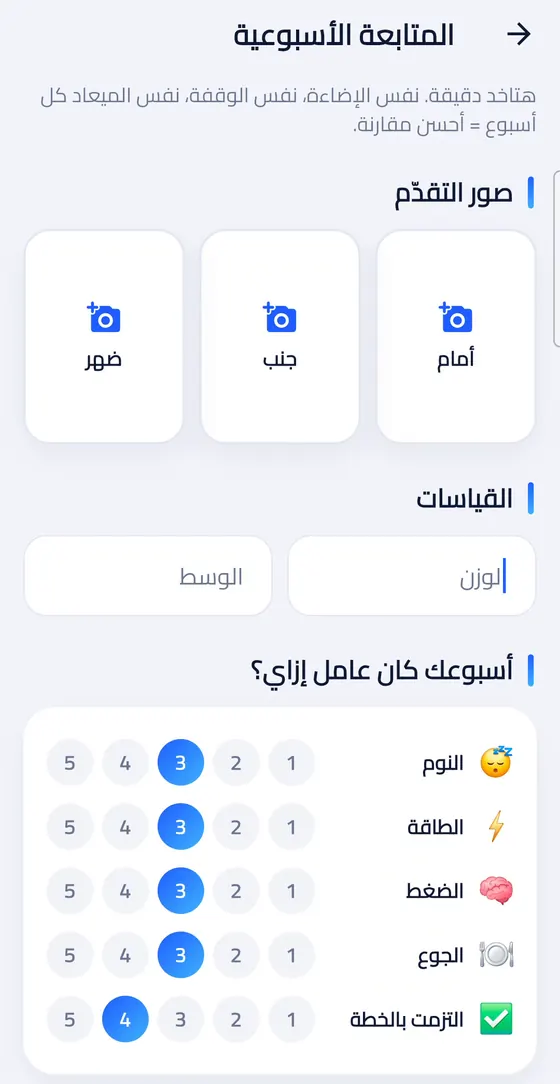
Once a week the trainee sends a check-in: three photos from the front, side and back, their weight and waist measurement, ratings for their sleep, energy, stress, hunger and how well they stuck to the plan, and notes for the coach. The coach replies to the check-in, and the reply reaches the trainee. Any two check-ins can be compared with a before/after slider on the same angle, along with the number of days between them and the weight change.
An InBody history with charts
Each InBody scan is recorded with its date: weight, body fat percentage, muscle, water and visceral fat, plus the per-segment readings when they are available. Charts show weight, fat and muscle over time, with a comparison against the previous scan in a plain sentence, such as fat went down and muscle went up. The trainee can photograph the printout, and if they agree, the numbers fill in by themselves and they review them before saving.
Stats, attendance and the log sheet
The Progress tab shows the day streak, the number of sessions, personal records, the total volume lifted, and a chart of weekly volume over the last eight weeks. An attendance calendar marks each training day as trained, partial or missed, and a session counts as complete when 70% or more of its exercises are done. The log sheet lays the program out week by week like the paper version, and marks weights that went up or down and reps that fell below the target. The sheet exports to PDF in the same layout as the coach's paper sheet.
Chat, calls and notifications
Every trainee has a private conversation with the coach, where they can send messages, photos and videos. Above the conversation are the coach's name and photo and two buttons, one for a voice call and one for a video call. New messages arrive as notifications, and the unread count shows on the tab.
The coach's dashboard
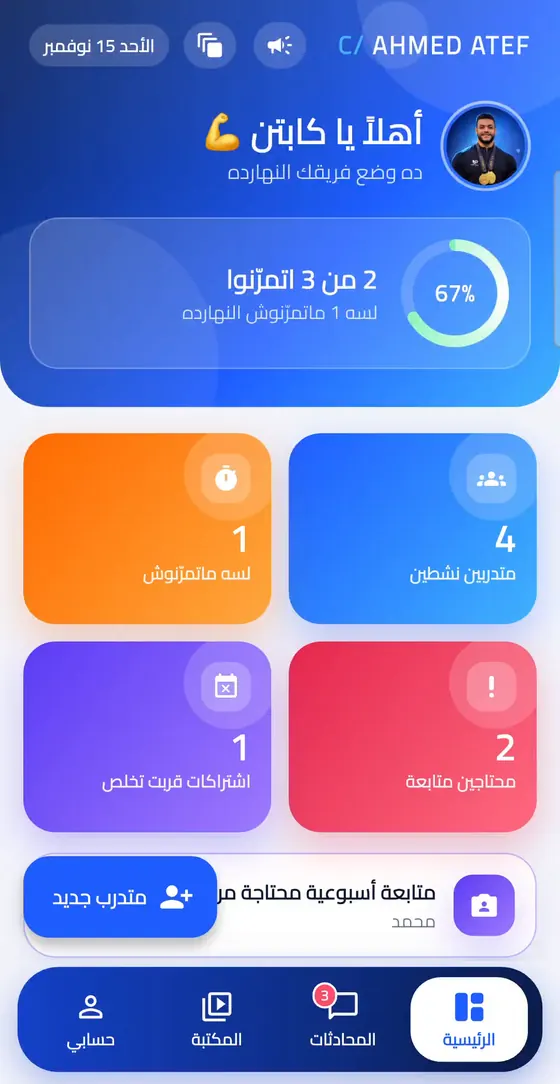
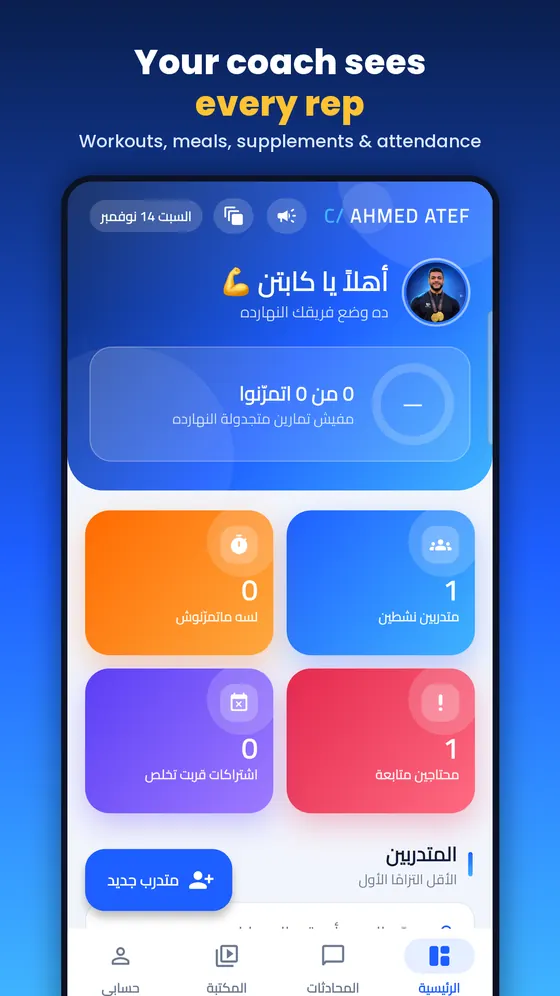
As soon as the coach opens the app he sees how the team is doing today: how many of the trainees with a session scheduled have trained, who has not yet, who needs attention, subscriptions ending soon, check-ins waiting for a reply, new subscription requests, and the best adherence over the last seven days. The trainee list is sorted from weakest adherence to strongest. Each trainee's file holds their program, log sheet, nutrition, check-ins and InBody, a Nudge button that sends them a notification with a ready message, and buttons to renew the subscription and pause the account.
Templates and automations
Any program the coach has built can be saved as a template, then given to several trainees at once with a start date, and each trainee's old program moves to their history. The same goes for meal plans. There are also three automatic messages the coach writes once, which are sent from his account in the trainee's chat: a welcome for a new trainee, a nudge when they miss several training days in a row, and a reminder before their subscription ends.
Broadcast notifications and banners
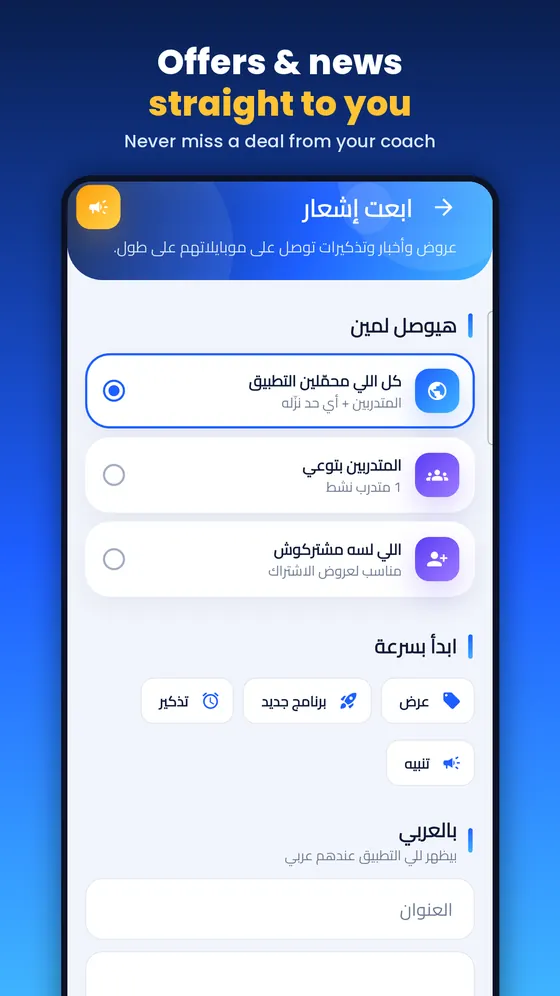
The coach can send a notification to his trainees, to everyone who installed the app, or to people who installed it but have no account. A notification has an Arabic text and an English text, each phone sees its own language, and there is a preview before sending. On the home screen, rotating banners carry a motivational line or a product ad with a WhatsApp or link button.
Visitor mode and subscription requests
Someone who installs the app without an account can enter as a visitor. They find the exercise videos, the sample programs and meal plans the coach has marked as visible to visitors, a calorie calculator that works out daily needs and body mass index, and a page about the coach that he writes himself from the app. If they want to subscribe, they sign in with Google, send a request with their goal and follow its status, and the coach accepts it, turning them into a trainee, or declines it.
Reports and coach tools
A reports screen brings together, for a period the coach picks: attendance, workouts logged per day, meals ticked off, when each trainee last opened the app, subscriptions ending soon, and his average reply time on check-ins. The coach also chooses the screen that appears when the app opens, his photo or a short video of himself, and he has a maintenance mode that shows trainees only a message while he updates something. And every user can choose from five colour themes.
Implementation stages
- Understanding the work: we started from the coach's paper sheet and his way of following up, and mapped out what a trainee does every day and what the coach needs to see.
- Backend: we designed the database and the API in PHP and MySQL: accounts, programs, logs, nutrition, check-ins and files, with permissions that let each trainee see only their own data.
- The core of the app: the workout program, the workout mode, the log sheet and attendance.
- Nutrition: the Egyptian food database, the meal and supplement plan, local reminders, and then the calculator and suggested plans.
- Follow-up: the weekly check-in with photos and the before/after slider, the InBody history with charts, and daily habits.
- Communication: chat with photos, video and form checks, notifications with Firebase, and voice and video calls.
- Coach tools: the dashboard, templates, automatic messages, broadcast notifications, banners and reports.
- Visitor mode: browsing without an account, the calculator, sample programs, subscription requests and the requests screen on the coach's side.
- Publishing: a privacy policy and an account deletion page, account deletion inside the app, publishing the app on Google Play, and preparing the iPhone version.
User experience
When the app opens, the coach's screen appears, his photo or the video he chose, with the app name and the line "Train hard. Track everything. Win." Then comes a sign-in screen with phone number and password, which states clearly that the coach creates the account, with a button to browse as a visitor and a WhatsApp button for people who have no account.
The Today tab opens with a greeting for the time of day and the trainee's name, their day streak, and how many exercises they have finished today. Below that is today's workout card with a Start or Continue button, followed by meals, supplements and habits. The trainee does not need to look for anything: what they have to do today is in front of them on one screen.
The Arabic version is written in colloquial Egyptian Arabic. The trainee reads friendly lines such as "Log weights to see your volume grow" rather than stiff system messages. And if the coach pauses a trainee's account, the trainee sees a screen telling them to contact the coach, not a vague error.
Results and impact
The app is published on Google Play in Arabic and English, and the coach uses it to create his trainees' accounts and follow them. We are not publishing user numbers or trainee results here; that is the coach's and his trainees' data.
What we can describe is what is now possible. The coach knows every day who trained and who did not without asking, sees every trainee's weights week by week, and replies to check-ins with their photos in the same place. He can build a program once and give it to several trainees, and the nudges go out by themselves.
The trainee now has their program, meals, supplements and whole history on their phone. They know what they lifted last time, see their personal records, their weekly volume and their before and after photos, and send the coach a form video or call him by voice or video without leaving the app.
The app and the website now work together: the coach's website introduces him and his services and points to the app, and the app is where the coaching itself happens.
Frequently asked questions
What is the Ahmed Atef Coach app?
It is coach Ahmed Atef's official app for his trainees, built by Younex with Flutter and published on Google Play. It has the workout program and a workout mode with a rest timer, the meal plan and supplements, the weekly check-in, an InBody history, chat and calls with the coach, and a follow-up dashboard for the coach.
Is the app available on iPhone?
The app is available now on Google Play for Android. The iPhone version is being prepared from the same code.
Who can create an account in the app?
Trainee accounts are created by Captain Ahmed himself; there is no open sign-up. Anyone can install the app and browse as a visitor, and anyone who wants to subscribe can send a request from inside the app or message the coach on WhatsApp.
Who can see my photos and data?
Only the trainee and their own coach. Photos and videos are shown after sign-in to their owner and to the coach, and no user can search for or contact any other user. Anyone can delete their account and data permanently from Account.
How does the app read an InBody sheet?
The trainee photographs the sheet, and the app first asks whether they agree to the photo being sent to Google Gemini to read the numbers. If they agree, the numbers fill in and they review them before saving; if they say no, they type them in by hand. Nothing else is sent apart from that photo.
Are there calls inside the app?
Yes, voice and video calls between the trainee and the coach, which ring full screen even when the phone is locked once the user has given permission, alongside a chat with messages, photos and videos.
Which technologies was the app built with?
The app is Flutter with one codebase for Android and iPhone, the backend is a REST API in PHP and MySQL, notifications use Firebase Cloud Messaging, calls use LiveKit, and the optional InBody reading uses Google Gemini.
How does the app relate to coach Ahmed Atef's website?
Both are Younex work for the same coach. The ahmedatef.fit website introduces the coach and his services and has a page for the app that links to Google Play, while the app is where the daily coaching and follow-up happen.